
An online commerce platform for sellers in Azerbaijan
Keep your sales channel open even when your shop is closed
Digisayt brings your store, products, stock, orders, payments and delivery into one panel. Prepare it as a draft first, publish when you are ready.
- Pilot phase
- Azerbaijani, Russian, English
- Draft mode
REAL The screens are real screenshots of demo stores (data marked DEMO is made up). The floating cards are illustrations. Click an image to enlarge it.
Why should your business have an online store?
An online store does not replace a physical shop: it adds a digital sales channel. Customers look at your products on their phone whenever they like, and you collect the orders in one panel.
A wider audience
Share the store address: your products are visible to passers-by and to everyone who receives the link.
A catalogue that ignores opening hours
The product catalogue can be browsed even when the shop is closed. You accept and process orders in the panel.
Orders and stock in one place
Replace calls, messages and notebooks with one order list in a single panel.
Your own brand
The storefront opens under your name, colours and address. The customer sees your store.
An online store does not guarantee higher sales. The result depends on your products, prices and how you work with customers.
This is how your store looks to a customer
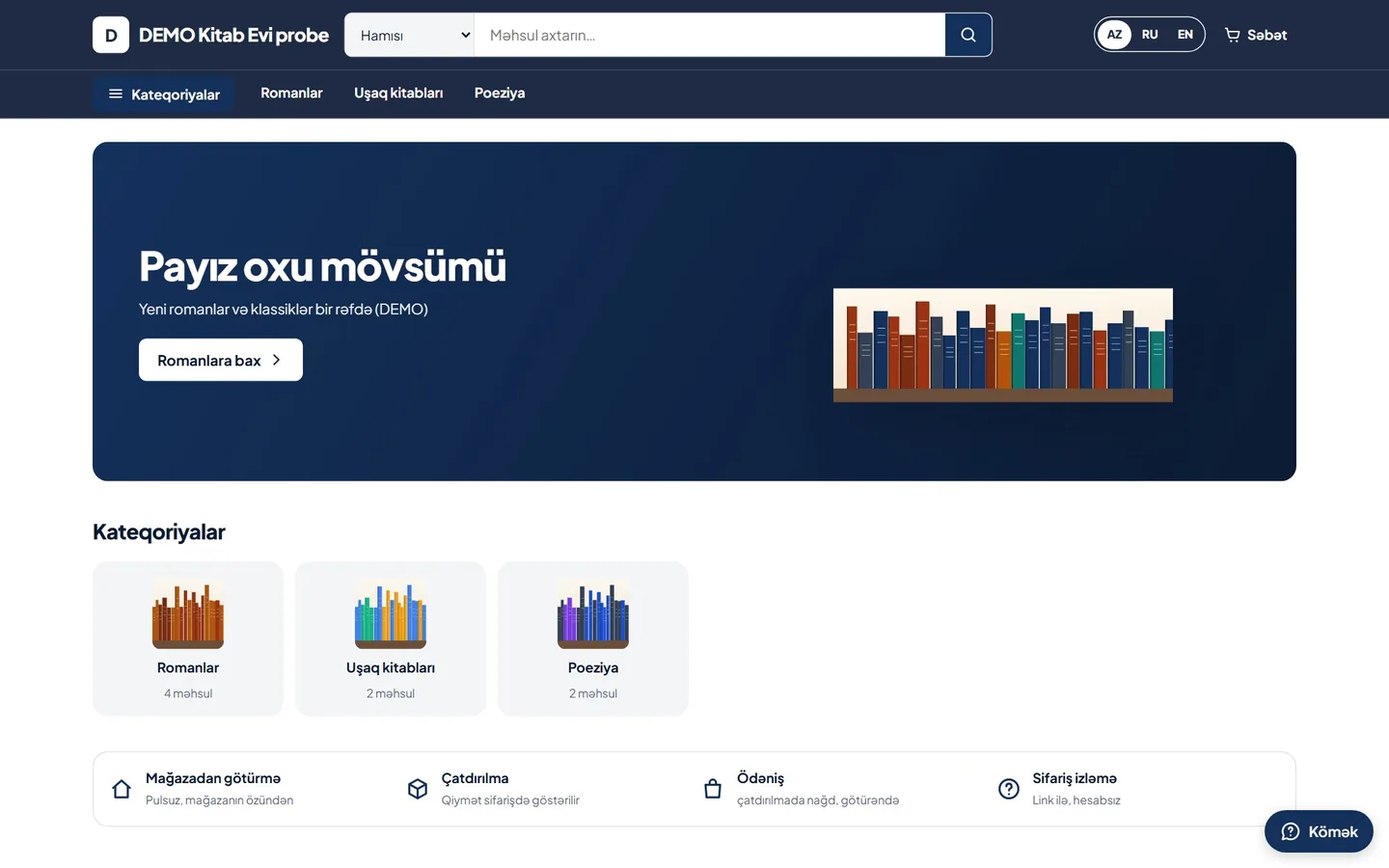
Two demo stores: the same platform, two different templates. Pick a desktop or phone view.
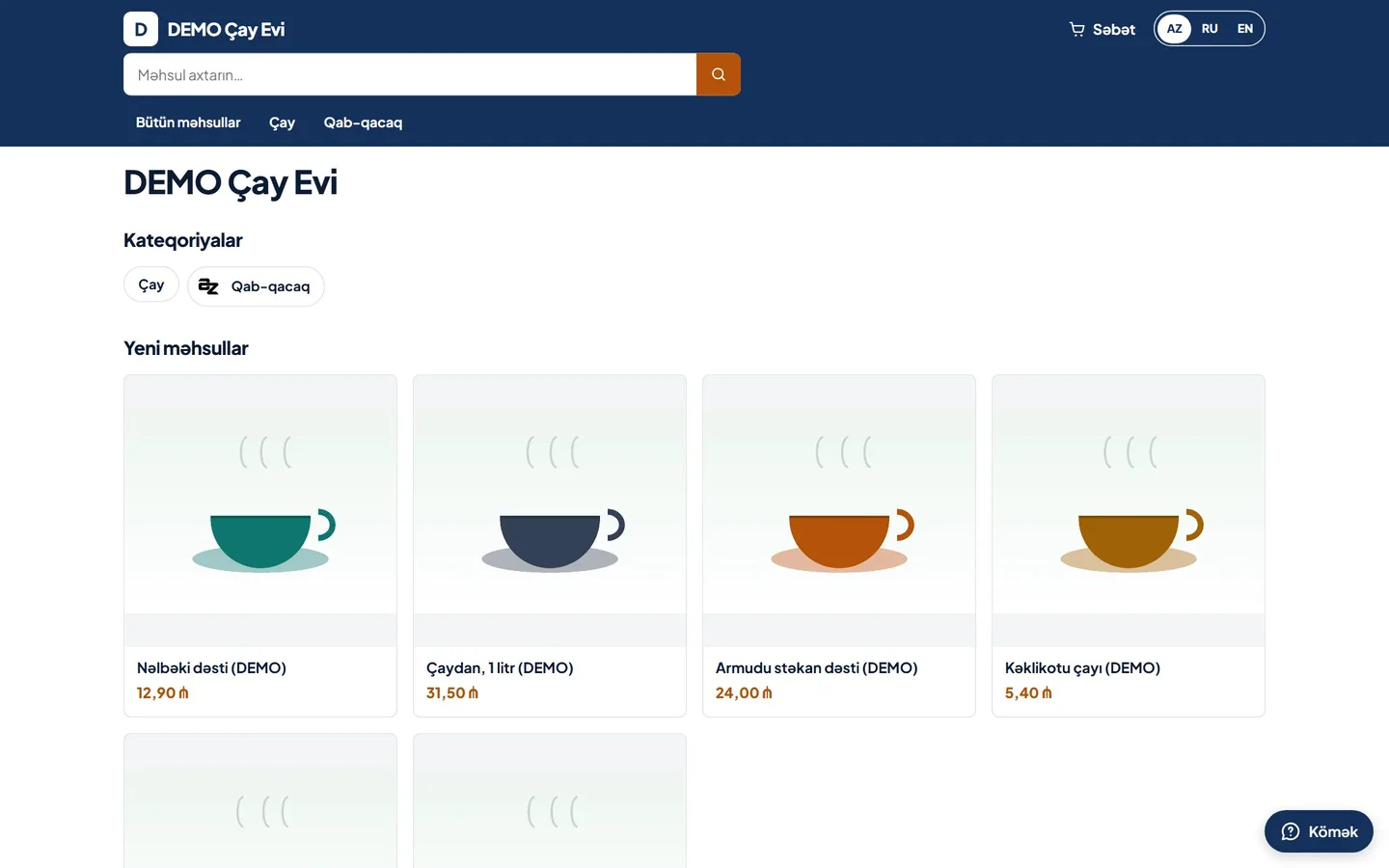
Çay Evi · Basic template. A clean, fast storefront: search, categories and a product grid.
REAL A real screenshot of the demo stores. Products and names are made up and marked "DEMO". The storefront has search, a cart, a language switch and a help button.
The seller panel: all the daily work in one place
Today's tasks, orders, products, delivery, payment and appearance are sections of the same panel.
- Today
- Orders
- Products
- Categories
- Delivery and pickup
- Finance overview
- Payment methods
- Design and home page
- Launch
The panel also fits a phone screen.
Products, catalogue and stock
Add products with prices, photos and stock, keep drafts, and publish when ready.
Product list
Manage products with search, category and status filters (draft, published, archived).
Stock levels
Each product's stock shows in the list so that a product that is out is not sold.
Categories and attributes
Group products into categories and add brands and attributes.
- Tea and tableware
- Books
- Cosmetics
- Clothing
- Gifts
- Groceries
Orders: from acceptance to completion
You see incoming orders in one list: who, what, how much, and the payment and delivery status.
The customer orders
They add products to the cart on the storefront and send the order.
You accept
You accept or reject the order. There is a response window.
You prepare
You get it ready for pickup or hand it over for delivery.
You record payment
You record or confirm a cash or bank-transfer payment.
It is completed
A handed-over order is completed and the history is kept.
The step diagram is conceptual. The screenshot below is of the real panel.
The panel's order statuses
- Waiting
- In progress
- Handed over
- Completed
- Cancelled
Which payment methods are there?
You choose which methods to offer.
Cash on delivery
The customer pays when receiving the order.
Payment at pickup
The customer pays when collecting the order from you.
Bank transfer
You enter the receiving account. The customer transfers and sends a receipt; you confirm the payment once the money arrives.
Online card payment is not active in the pilot yet and is not promised here. With a bank transfer the money goes straight to you; Digisayt does not hold it.
Pickup, delivery and couriers
The customer chooses how to get the order: collect it themselves or have it delivered.
Pickup from the shop
The customer collects the order from your address. It is free for them.
Delivery
You or your courier deliver the order to the customer.
Both
The customer chooses when ordering.
How you set the delivery fee
- One fee
- Free delivery
- By zone
- The buyer pays the carrier
You assign a courier to an order and follow the delivery stages in the panel.
A store under your brand
Pick a template, adjust the colours and the home page. Changes stay a draft until you publish them.
Two templates
The Basic and Advanced templates work with the same products and orders.
Brand and colours
The storefront's colours and look are adapted to your brand.
Home page and banners
You choose what the home page shows in the panel itself.
The live preview shows a change before you publish it. The choice of ready-made templates is widened step by step.
How a store opens, step by step
The aim is simple: confirm your phone, get a draft store, prepare it and publish.
Register
You confirm your phone number with an SMS code. There is no other complicated step.
A draft store
After confirmation a draft store is created for you; it is not open to the public.
Prepare
Prepare products, prices, stock, payment and delivery while the store is a draft.
Check
The readiness checklist shows what is missing: an address, a product, payment and delivery.
Publish
When the checklist is complete, you publish the store yourself.
Open registration is not active yet: in the pilot, the first step is replaced by an application and an invitation. An immediate opening of the store is not promised.
You stay in control
Digisayt is the technical platform. The store, the prices, the sales revenue and the relationship with customers are your business.
You set the prices
You choose product prices, the delivery fee and the payment methods.
The sales revenue is yours
With cash and bank transfer the payment reaches you directly; Digisayt does not hold it.
Data is kept separate
Each store's data is kept apart from other stores.
Pause and reopen
You can pause a published store and open it again when needed.
Who is responsible for what
| Who is responsible for what | Digisayt (the platform) | The seller |
|---|---|---|
| Revenue and money | Provides the technical platform. Does not hold cash or bank-transfer funds. | The revenue belongs to the seller, who enters the receiving account and confirms payments. |
| Offline payment | Provides tools for receipts and payment records. | Accepts and checks cash and transfers, and deals with deadlines and disputes. The rules are a draft. |
| Delivery | Provides tools to follow order stages and courier records. | Organises delivery, sets the fee and manages the courier. |
| Tax and records | Gives no legal advice. | Meets the legal obligations. The rules await legal review. |
The table describes the current product. The final legal split will be confirmed in the legal documents.
Digisayt does not guarantee a seller's earnings. The legal ownership of data and the rules of use will be set out in the legal documents, which are not approved yet.
The pilot phase and open registration
Digisayt is currently in a pilot phase. It is a temporary phase and not the permanent rule of the product.
Now: the pilot
- Stores open by application and invitation.
- The team chooses the participants. The specific criteria have not been announced, and applying does not give a right to take part.
- The invited number is confirmed with an SMS code. This is switched on as the service becomes ready.
- A store is created as a draft first and is not opened to the public straight away.
Planned: open registration
- Anyone will be able to register by confirming a phone number with an SMS code.
- A draft store will be created automatically after confirmation.
- Invitations will remain for administrative and pilot onboarding, and will not be required for registration.
Public registration is not open yet. Write to us and we will reply with how you can start. This is an expression of interest, not a registration or a reservation.
The date of open registration has not been announced and is not promised here.
Plans and obligations
The plan amounts have not been approved and are not shown in this version. When announced, the following will be here:
Digisayt provides a technical platform and does not guarantee a seller's income, sales volume or profit. The platform does not charge a subscription fee yet. Applying any fee needs a separately approved implementation.
The plan structure is being prepared
- The structure and terms of the plans
- The plans and what they include
- Additional services
- Matters not yet decided
Frequently asked questions
Type your question or browse the list.
13 questions shown
What is Digisayt?
Digisayt is a commerce platform where sellers open an online store and manage products, stock, orders, payment and delivery in one panel.
Can I sign up now?
Not yet. The platform is in a pilot phase: stores open by application and invitation. Open registration with an SMS code is planned; no date has been announced.
Why is there no open sign-up yet?
Accounts are confirmed with an SMS code sent to the phone number. We are not opening sign-up until that service is ready.
How much does it cost?
The plan structure is described in the "Plans and obligations" section. Matters not yet approved are listed there separately.
Which payment methods are supported?
Cash on delivery, payment at pickup and bank transfer. Online card payment is not active yet.
How does the money reach me?
With cash and bank transfer the customer pays you directly. You confirm a bank transfer after checking the receipt. Digisayt does not hold this money.
How is delivery organised?
You choose pickup, delivery to an address, or both. You manage the delivery fee and the couriers yourself.
Which languages are supported?
The seller panel and the storefront support Azerbaijani, Russian and English. This page is in the same three languages.
Can I publish my store straight away?
The store is created as a draft first. To publish, the readiness checklist must be complete: an address, at least one product, payment and delivery.
Can I manage it from a phone?
The seller panel and the storefront are adapted to small screens. You can do much of the work from a phone.
Who owns the customer data?
Each store's data is kept apart from other stores. Legal ownership and processing rules will be set out in the legal documents, which are not approved yet.
Can I pause my store?
Yes, you can pause a published store from the panel's Launch section and open it again. The platform may also suspend a store under its rules.
When will card payment arrive?
No date has been announced. We do not promise what is not ready.
Get in touch
Tell us briefly about your business. We reply by e-mail or phone.